Template Literals in JavaScript

Problems with traditional string concatenation
Traditional string concatenation uses the + operator:
let name = "Hitakshi";
let message = "Hello " + name + ", welcome!";
🔴 Problems with This Approach
1️⃣ Hard to Read
When strings become long, the code looks messy.
let msg = "Hello " + name + ", your score is " + score + " and your grade is " + grade;
👉 Difficult to read and understand.
2️⃣ Difficult to Manage Multiple Variables
If you have many variables, it becomes confusing.
let msg = "Name: " + name + ", Age: " + age + ", City: " + city;
👉 Too many + signs make it cluttered.
3️⃣ Error-Prone
Easy to forget spaces or +.
let msg = "Hello"+name; // Missing space
Output:
HelloHitakshi
4️⃣ Not Suitable for Multi-line Strings
let msg = "Hello " + name + " Welcome to the course";
👉 Can be confusing and less clean.
5️⃣ Poor Maintainability
If you need to update or modify the string later, it's harder.
✅ Better Alternative: Template Literals
Modern JavaScript (ES6) introduced template literals using backticks `.
let msg = Hello \({name}, your score is \){score};
✔ Cleaner ✔ Easier to read ✔ Supports multi-line strings
Simple Comparison ❌ Traditional "Hello " + name + " your age is " + age ✅ Modern Hello \({name}, your age is \){age}
Template literal syntax
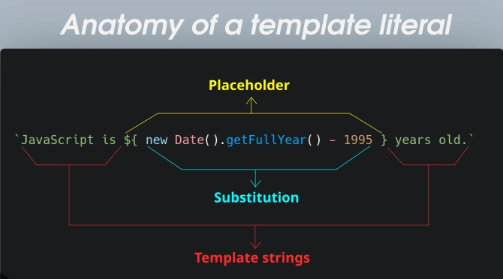
Template literals in JavaScript are enclosed by backticks (`) instead of single or double quotes, and they allow for embedded expressions using the syntax ${expression}. This feature, introduced in ES6, simplifies string interpolation and the creation of multi-line strings.
Key Syntax Elements
Backticks (
`): These delimiters define the start and end of a template literal.Expression Placeholders (
${}): Any valid JavaScript expression placed inside a placeholder is evaluated, and the result is inserted into the string.Usage Examples
String Interpolation
Template literals provide a cleaner way to insert variables and expressions into a string compared to traditional concatenation.
const name = 'Alice'; const greeting =
Hello, ${name}!; console.log(greeting);// Output: Hello, Alice!
const a = 5; const b = 10; console.log(
The sum of \({a} and \){b} is ${a + b}.);// Output: The sum of 5 and 10 is 15. Multi-line Strings Line breaks within the backticks are preserved, eliminating the need for escape characters like \n.
const multiLine = `
  This is line one
  This is line two
  This is line three
`;
console.log(multiLine)
Embedded Expressions and Function Calls
function func() {
  return 10;
}
const str2 = `The return value from the function is ${func()}`;
console.log(str2);

//output: the return value from the function is 10.

const loggedIn = true;
const greetingConditional = `Welcome, ${loggedIn ? "User" : "Guest"}!`;
console.log(greetingConditional);

//output: welcome, User!
Embedding variables in strings
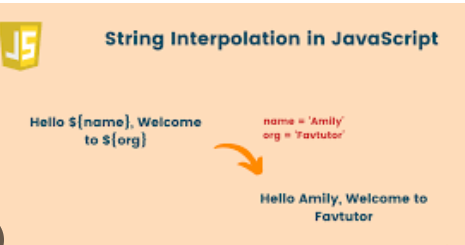
Embedding variables means:
Putting variables directly inside a string.
🔴 Old Way (String Concatenation)
let name = "Hitakshi"; let age = 20;
let message = "Hello " + name + ", you are " + age + " years old.";
console.log(message);
👉 This works, but becomes messy with many variables.
✅ Modern Way: Template Literals
JavaScript provides template literals (using backticks `) to easily embed variables.
📌 Syntax text ${variable}
🔹 Example
let name = "Hitakshi"; let age = 20;
let message = Hello \({name}, you are \){age} years old.;
console.log(message);
Output Hello Hitakshi, you are 20 years old.
🔹 Embedding Expressions
You can also perform calculations inside ${}.
let a = 5;
let b = 3;
let result = Sum is ${a + b};
console.log(result);
Output:
Sum is 8
🔹 Multi-line Strings let msg = Hello ${name}, Welcome to JavaScript!;
console.log(msg);
✔ Works easily without +
🔥 Key Points
✔ Use backticks `
✔ Use ${} to insert variables
✔ Can include expressions (calculations)
✔ Makes code clean and readable
Multi-line strings
Multi-line strings are strings that span more than one line.
🔴 Problem with Old Way (Concatenation)
Before modern JavaScript, multi-line strings were written using +:
let message = "Hello " +
              "Welcome to JavaScript " +
              "Programming";

console.log(message);
❌ Problems:
Messy and hard to read
Requires
+on every line
✅ Modern Way: Template Literals
Using backticks ` (template literals), we can write multi-line strings easily.
Example
let message = `Hello
Welcome to JavaScript
Programming`;

console.log(message);
Output
Hello
Welcome to JavaScript
Programming
🔹 Example with Variables
let name = "Hitakshi";

let message = `Hello ${name},
Welcome to JavaScript!`;

console.log(message);
Key Points
✔ Use backticks `
✔ No need for +
✔ Supports line breaks automatically
✔ Can embed variables using ${}
Simple Idea
Old way ❌
"Hello " +
"World"

Modern way ✅
`Hello
World`
When to Use
Writing long messages
Displaying formatted text
Creating HTML templates in JS
Use cases in modern JavaScript
✅ Use Cases of Template Literals & Multi-line Strings in Modern JavaScript
Template literals (backticks `) are widely used because they make code clean, readable, and powerful.
🔹 1️⃣ Dynamic Messages (Embedding Variables)
Used to display user data or dynamic values.
let name = "Hitakshi"; let score = 90;
let message = Hello \({name}, your score is \){score};
✔ Common in apps and forms
🔹 2️⃣ Creating HTML Templates (Very Important 🔥)
Used in web development to generate HTML dynamically.
let user = "Hitakshi";
let html = <div> <h1>Hello ${user}</h1> <p>Welcome to the website</p> </div>;
✔ Used in frameworks like React, Vue, etc.
🔹 3️⃣ Multi-line Strings
No need for + or \n.
let text = Line 1 Line 2 Line 3;
✔ Cleaner formatting
🔹 4️⃣ Expressions Inside Strings
You can directly perform calculations.
let a = 5; let b = 3;
console.log(Sum is ${a + b});
🔹 5️⃣ Building URLs Dynamically let userId = 101;
let url = https://api.example.com/user/${userId};
✔ Common in APIs
🔹 6️⃣ Logging and Debugging
let name = "Hitakshi"; console.log(User name is ${name});
✔ Better readability than concatenation
🔹 7️⃣ Email / Message Formatting
let name = "Hitakshi";
let email = `Dear ${name},
✔ Clean multi-line formatting