TCP vs UDP
The internet is a huge global network made up of millions of computers, servers, routers, and cables.
For all these different machines—built by different companies, running different operating systems, and located in different countries—to communicate smoothly, they must follow common rules.
These rules are called protocols.
Without rules, data sent from one computer might be misunderstood, lost, duplicated, or arrive in the wrong order. Protocols define how data is packaged, addressed, transmitted, received, and interpreted across the network.
For example:
IP (Internet Protocol) decides where data should go
TCP and UDP decide how data is delivered
DNS decides how names are translated into addresses
HTTP/HTTPS decide how web data is requested and served
Together, these protocols ensure that when you send a message, open a website, or stream a video, the data reaches the correct destination reliably, efficiently, and securely.
👉 In short, the internet works because everyone follows the same set of rules for sending data.What are TCP and UDP
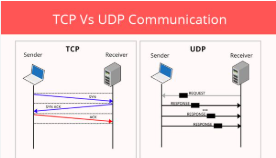
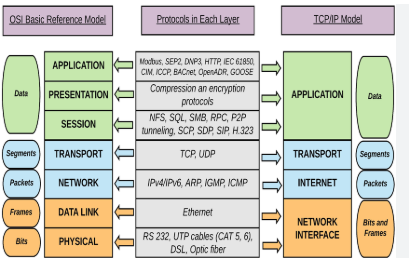
TCP and UDP are transport-layer protocols that decide how data is sent between computers over a network. They control how data travels from one device to another.
TCP (Transmission Control Protocol)
🔹 What TCP does
TCP provides reliable, ordered, and error-checked delivery of data.
Features
Connection-oriented (3-way handshake)
Guarantees data delivery
Maintains correct order
Retransmits lost data
Slower but reliable
Used in
Websites (HTTP/HTTPS)
Emails
File transfers
APIs
UDP (User Datagram Protocol)
🔹 What UDP does
UDP sends data without checking delivery or order.
Features
Connectionless
No guarantee of delivery
No retransmission
Very fast
Low overhead
Used in
Video streaming
Online gaming
Voice calls (VoIP)
Live broadcasts
🆚 TCP vs UDP (Quick Comparison)
| Feature | TCP | UDP |
| Connection | Required | Not required |
| Reliability | Guaranteed | Not guaranteed |
| Speed | Slower | Faster |
| Order | Preserved | Not preserved |
| Use case | Accuracy | Speed |
Simple analogy
TCP = registered post (safe & tracked)
UDP = normal post (fast but no tracking)
When to use TCP
Use TCP (Transmission Control Protocol) when data integrity, accuracy, and ordered delivery are critical, such as for web browsing (HTTP/HTTPS), file transfers (FTP), email (SMTP/IMAP), and secure shell (SSH) access. It is ideal for applications that cannot tolerate packet loss or data corruption, ensuring reliable, connection-oriented communication.
Key Scenarios for Using TCP:
Web Browsing (HTTP/HTTPS): Essential for loading webpages correctly, ensuring no data is missing or corrupted.
File Transfers (FTP/SFTP): Ensures files (like software downloads) are transmitted accurately without errors.
Email (SMTP, POP, IMAP): Guarantees messages and attachments are delivered fully.
Remote Administration (SSH, Telnet): Requires a reliable, persistent, and ordered stream of data for commands.
Database Connections: Crucial for applications where data accuracy is paramount, such as SQL queries.
Why Choose TCP?
Reliability: TCP provides error checking, retransmission of lost packets, and guarantees data delivery.
Ordered Delivery: It ensures packets arrive in the correct sequence.
Connection-Oriented: A stable session is established before data is exchanged.
When Not to Use TCP:
Avoid TCP for real-time, low-latency applications like live voice/video streaming or online gaming, where speed is more important than losing a few packets. In those cases, UDP is preferred
When to use UDP
UDP (User Datagram Protocol) should be used when speed and low latency matter more than perfect reliability. Use UDP when it’s okay to lose some data, but not okay to be slow.
Best situations to use UDP
1️⃣ Live video & audio streaming
Zoom, Google Meet, YouTube Live
Missing 1–2 frames is better than freezing
👉 UDP avoids delays caused by retransmissions.
2️⃣ Online gaming
Multiplayer games need real-time updates
Late data is useless
👉 Speed > accuracy.
3️⃣ Voice over IP (VoIP)
Internet calls
Small packet loss is unnoticeable
Delay is very noticeable
4️⃣ Real-time sensors & IoT
Weather sensors
GPS tracking
Live telemetry
👉 Data is continuously updated.
5️⃣ Broadcasting & Multicasting
Live sports
TV streaming
One sender → many receivers
👉 UDP is efficient for this.
6️⃣ Simple request–response protocols
Examples:
DNS
DHCP
SNMP
👉 Small, fast messages.
Common real-world examples of TCP vs UDP
When NOT to use UDP
File downloads
Emails
Banking transactions
Web pages where accuracy matters
Use TCP instead.
Simple analogy
UDP = live phone call (some words may drop)
TCP = email or courier (everything must arrive)
Common real-world examples of TCP vs UDP
TCP (Transmission Control Protocol) and UDP (User Datagram Protocol) serve different needs: TCP provides reliable, ordered, and error-checked delivery (ideal for accuracy), while UDP offers fast, connectionless, and lightweight transmission (ideal for speed). Common TCP examples include web browsing (HTTP/HTTPS), email (SMTP), and file transfers (FTP). UDP is used for real-time applications like online gaming, VoIP, and live video streaming.
Real-World Examples of TCP (Reliability Focus)
Web Browsing (HTTP/HTTPS): When loading web pages, all data must arrive accurately to display properly.
File Transfer (FTP, SFTP): Ensuring files (like documents or software downloads) are not corrupted during transfer.
Email (SMTP, IMAP, POP): Guaranteeing that an email is delivered exactly as sent.
Remote Desktop/SSH: Securely managing remote servers where command accuracy is critical.
Streaming Content (Netflix/YouTube): Using buffering to ensure high-quality playback, prioritizing complete data over real-time speed.
Real-World Examples of UDP (Speed/Latency Focus)
Online Gaming (Fortnite, Call of Duty): Fast updates are more important than receiving every single packet; if a packet is lost, the game simply waits for the next update.
Video Conferencing (Zoom, Skype, WhatsApp): Real-time, two-way communication requires low latency; occasional minor audio/video glitches are better than high lag.
Voice over IP (VoIP): Similar to video conferencing, speed is prioritized for smooth audio.
DNS (Domain Name System): Resolving website names to IP addresses quickly to initiate fast web browsing.
Live Sports Streaming: Real-time data delivery is more important than perfect picture quality, preferring lower latency.
Key Differences Summary
TCP: Connection-oriented, retransmits lost packets, slower.
UDP: Connectionless, no retransmission, faster.
What is HTTP and where it fits
What is HTTP?
HTTP (Hyper Text Transfer Protocol) is a set of rules that defines how web clients and web servers communicate. HTTP is the language used by browsers and servers to talk on the web.
What HTTP Does
HTTP defines:
How a request is sent (GET, POST, etc.)
How a response is returned
Status codes (200, 404, 500)
Headers and body structure
Example:
    Browser → HTTP Request → Server
    Browser ← HTTP Response ← Server
Where HTTP Fits in the Internet Stack
HTTP does not send data itself. It sits on top of other protocols.
    Application Layer   → HTTP / HTTPS
    Transport Layer     → TCP (or QUIC for HTTP/3)
    Internet Layer      → IP
    Network Layer       → Ethernet / Wi-Fi
👉 HTTP focuses on what is being sent, not how it physically travels.
HTTP vs HTTPS
HTTP → data in plain text
HTTPS → HTTP + TLS encryption (secure)
Modern web always uses HTTPS.
Where HTTP is used
Websites
REST APIs
Mobile apps
Microservices
Simple analogy
HTTP = language of conversation
TCP = delivery service
IP = address system
Relationship between TCP and HTTP
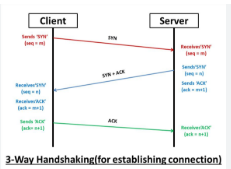
An HTTP request flows over a TCP connection by first establishing a reliable, connection-oriented tunnel via a three-way handshake (SYN, SYN-ACK, ACK). Once connected, the client sends HTTP data (request line, headers, body) as a stream of bytes through this TCP socket. The server processes this request and sends back a response, utilizing the same TCP connection.
Key Aspects of the HTTP/TCP Flow:
Connection Establishment: Before any data is sent, the browser/client initiates a TCP connection with the server (usually on port 80 for HTTP or 443 for HTTPS).
Data Transmission: The HTTP request (e.g.,
GET / HTTP/1.1) is transmitted in TCP packets, which are guaranteed to arrive in order and without errors.Packetization: The HTTP request data is broken into segments, transmitted across the network, and reassembled at the destination.
Connection Persistence: Modern HTTP (1.1+) uses persistent connections to reuse the same TCP connection for multiple requests, reducing latency.
Closing the Connection: The connection is either closed by the client/server after the response is complete or kept open for subsequent requests.
Steps in the Flow:
DNS Lookup: The browser resolves the URL to an IP address.
TCP Handshake: A three-way connection is established (SYN →right arrow→ SYN-ACK →right arrow→ ACK).
HTTP Request: The browser sends the formatted HTTP request (method, headers, body).
Server Processing: The server receives, parses, and processes the request.
HTTP Response: The server sends back the requested data.
Connection Closure/Re-use: The connection is terminated or reused for further requests.
Relationship between TCP and HTTP
HTTP and TCP work together, but they do different jobs in the internet stack. HTTP defines what is sent, TCP defines how it is delivered reliably.
Where They Fit (Layered View)
 Application Layer   → HTTP
 Transport Layer     → TCP
 Internet Layer      → IP
HTTP sits at the application layer
TCP sits at the transport layer
HTTP depends on TCP to move its data.
How HTTP Uses TCP (Step-by-Step)
Browser wants a web page
TCP connection is established (3-way handshake)
HTTP request is sent over that TCP connection
Server sends HTTP response
TCP ensures:
Data arrives
Data is in order
Lost packets are retransmitted
Connection is closed or reused
Why HTTP Needs TCP
TCP provides:
Reliability (no lost data)
Correct order
Error detection
Flow control
Web pages must load correctly, not partially—so TCP is ideal.
What HTTP does NOT do
HTTP does not:
Handle packet loss
Guarantee delivery
Manage connections
That’s TCP’s job.
HTTP over TCP vs HTTP over UDP
HTTP/1.1 & HTTP/2 → use TCP
HTTP/3 → uses QUIC (built on UDP) for lower latency
Simple analogy
HTTP = message content
TCP = reliable courier
IP = address system

